

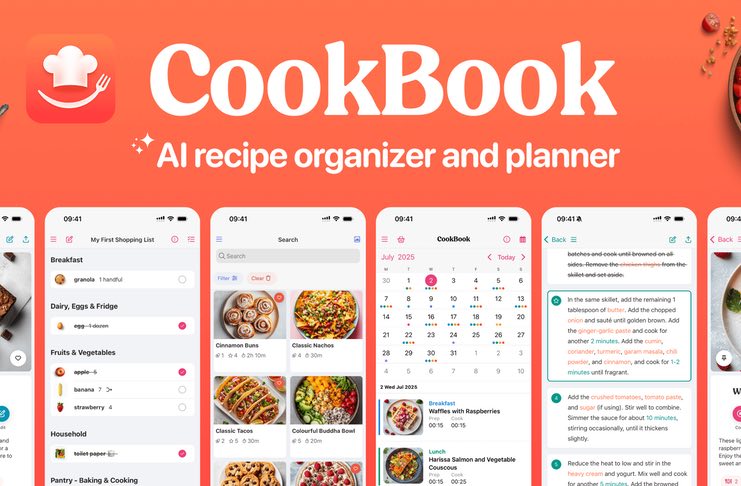
If your recipes are scattered between food blogs, TikTok videos, restaurant-inspired dishes, printed cookbooks, and random experiments from your own kitchen, a dedicated recipe manager can bring some much-needed order to the chaos. The quick answer: CookBook is the best match for people collecting recipes from lots of different sources who want social posts, websites, and photographed cookbook pages all connected to meal plans and shopping lists. Paprika is the better option for a classic website-clipping workflow with excellent offline access and a one-time purchase rather than a subscription. Recipe Keeper works well for cooks who simply want an easy, familiar digital cookbook that works across mobile and desktop.
There is no single winner here. Each app is designed around a slightly different type of cook. The trick is figuring out which one matches the way you actually use recipes.
What Really Makes One Recipe Manager Better Than Another?
The best recipe manager is the one that fits the way you already collect and use recipes, rather than simply having the biggest list of features. Before putting CookBook, Paprika, and Recipe Keeper head-to-head, it makes sense to judge all three using the same eight criteria. If you want to go deeper into creating a system for your recipes, our guide to organizing a chaotic recipe collection takes you through the process step by step.
- Capture sources: Can you bring in recipes from websites, social video platforms, physical cookbooks, and handwritten cards, or are you limited to just a couple of sources?
- Organization: How useful are the tags, categories, search tools, and favourites once your collection grows beyond a few dozen recipes?
- Editing: Is it straightforward to correct a recipe that imported badly, or create your own recipe from scratch?
- Planning: Does it support daily, weekly, or monthly meal planning, and does it automatically connect your plans to saved recipes?
- Shopping: Can ingredients be turned into a shopping list automatically, and are they sorted into useful supermarket aisles?
- Device support: Which platforms are covered — iOS, Android, web, and desktop — and are you paying once or separately for each one?
- Privacy: Where is your recipe data stored, does it sync through the company’s cloud, and can you easily export your collection if you decide to leave?
- Pricing model: Is it subscription-based or a one-off purchase, and what happens to your recipes if you stop paying?
Using those benchmarks, here’s how the three apps compare.
Is CookBook Worth It for a Mixed-Source Recipe Collector?
Yes, especially if your recipes come from all over the place. The CookBook recipe manager is designed for cooks who save recipes from Instagram, TikTok, and Pinterest alongside website recipes and pages from printed cookbooks. Instead of leaving all those screenshots, links, and notes scattered around, it brings them together in one searchable library.
Of the three apps, CookBook offers the broadest range of import options. It can pull recipes from websites, Instagram, TikTok, Facebook, and Pinterest, while its AI Recipe Scanner can turn a photograph of a cookbook page or handwritten recipe card into an editable recipe. There’s also an AI Chef feature that can create recipe variations or suggest ingredient swaps when you need them — something the other two apps don’t provide. Once you’ve imported a recipe, ingredients within the instructions are connected to their exact quantities, meaning you can tap an ingredient in the method and see its amount without jumping back to the ingredient list. If you’re also trying to keep better track of everyday staples, our piece on stocking a kitchen that cuts down on last-minute grocery runs is a useful companion to this setup.
CookBook also puts a lot of emphasis on meal planning and shopping. You can plan meals by day, week, or month, then turn those plans into a shopping list arranged by aisle. In the US and Canada, an Instacart integration also allows you to order directly from the list. The app syncs between iPhone, iPad, Mac, and its web app, meaning you don’t have to worry about buying a separate licence for every device.
You can try CookBook for free with up to 20 saved recipes, while the annual subscription comes with a 14-day trial. Once you go beyond the free allowance, you’ll need a monthly or annual subscription rather than making a one-off payment. That’s something to consider if you’re firmly in the “pay once and forget about it” camp. Watch this review video for more tips
Best fit: cooks with a genuinely varied recipe collection — think social videos, food blogs, cookbook pages, and family recipe cards — who also want AI tools to help tidy up messy imports.
Is Paprika Still the Best Website-Clipping App?
Yes, particularly if the majority of your recipes live online and you’d rather make a one-time payment than take on another subscription. Paprika Recipe Manager 3, created by Hindsight Labs, has been a major name in this category for more than a decade, and TechRadar has singled it out as a great choice for bringing together recipes scattered around the internet. Its built-in browser lets you save a web page as a clean recipe with a single tap.
Paprika’s biggest advantages are its speed and dependable offline functionality. Recipes from most major cooking websites can be downloaded with one tap, while anything else can be copied and pasted directly into the editor. Serving sizes can be changed instantly, with ingredient quantities and measurements adjusted as you scale the recipe. It also includes a pantry tracker for monitoring what you already have and when items expire, plus a grocery list that combines ingredients and sorts them by aisle. The meal planner offers daily, weekly, and monthly views, along with reusable saved menus. Once a recipe has been saved, it works completely offline, which can be especially handy when you’re cooking somewhere with unreliable internet.
The downside comes with its platform pricing. Paprika uses a one-time purchase model, currently around $4.99 on iOS or Android and $29.99 on Mac, while Windows is sold separately. There’s no single subscription covering every device, so someone using Paprika on a phone, tablet, and laptop will need to pay for each platform. Its import capabilities are also more limited than CookBook’s because it isn’t designed to extract recipes directly from Instagram or TikTok videos.
Best fit: cooks who primarily save recipes from websites, need reliable offline access, and would rather make a one-off payment per device than commit to an ongoing subscription.
Watch this video to get a glimpse:
Is Recipe Keeper Simple Enough for a Casual Home Cook?
Yes, particularly if what you’re after is more of a straightforward digital cookbook than an all-in-one kitchen management system. Recipe Keeper, created by Tudorspan Limited, keeps things deliberately familiar: enter a recipe with as much or as little information as you need, add a photo, give it a rating, and organise it by course or category.
Recipe Keeper’s biggest strengths are its migration tools and voice integration. It can import existing recipe collections from a long list of older apps, including Paprika, BigOven, MasterCook, and Living Cookbook. That makes it a useful option if you’re moving away from an app you’re no longer using. It also works with Amazon Alexa, allowing you to ask Alexa to open a recipe, guide you through the instructions hands-free, or add an ingredient to your shopping list. The shopping list groups products automatically by aisle, while the meal planner covers the essentials without adding loads of complexity. General app roundups such as Digital Trends’ guide to recipe apps generally place Recipe Keeper in this simpler, notebook-style category rather than alongside the more automated meal-planning options.
Recipe Keeper’s free version also stops at 20 saved recipes, much like CookBook. Beyond that, however, you pay for a one-time Pro upgrade rather than a subscription. Recent pricing puts the upgrade at around $19.99 on iOS and Android and $29.99 on Mac, with each platform purchased separately. Apple Family Sharing isn’t supported, so two people using different Apple IDs each need their own Pro purchase. There’s also no web app, which could be inconvenient if you prefer planning meals from a laptop. If your main challenge is bringing a messy collection together, our rundown on digitizing handwritten family recipes is worth checking out before choosing an app.
Best fit: cooks looking for an uncomplicated, familiar cookbook-style app, particularly those moving recipes from an older service such as Paprika or BigOven, and households that are happy with a one-time payment for each device.
Watch this video to get a glimpse:
CookBook, Paprika, and Recipe Keeper Compared
| Criteria | CookBook | Paprika | Recipe Keeper |
|---|---|---|---|
| Import sources | Websites, Instagram, TikTok, Facebook, Pinterest, photo/handwritten scan | Websites (one-tap or copy-paste) | Websites, copy-paste, import from other recipe apps |
| Meal planning | Day, week, or month | Day, week, or month, plus saved menus | Basic weekly planner |
| Shopping list | Auto-sorted by aisle, Instacart order (US/Canada) | Auto-combines and sorts by aisle | Auto-sorted by aisle |
| Device support | iOS, Android, Mac, web (one plan) | iOS, Android, Mac, Windows (separate purchases) | iOS, Android, Mac, Windows (separate purchases, no web app) |
| Pricing model | Free up to 20 recipes, then subscription (14-day trial on yearly) | One-time purchase per platform | Free up to 20 recipes, then one-time Pro purchase per platform |
| Offline access | Yes | Yes, fully offline | Yes |
Worth the Trip: Which One Should You Actually Try First?
Before settling on one of these apps, give yourself a proper real-world test. Choose five recipes you’d genuinely make during an average week: one from a website, one from a social video you’ve saved, one from a physical cookbook or family recipe card, and two others from your usual sources. Try importing or entering all five into the free version of each app. Pay attention to how much tidying each import requires, whether ingredient quantities transfer accurately, and how simple it feels to turn those recipes into a meal plan and shopping list. The Manual’s own roundup of recipe apps uses a similarly hands-on method, testing its selections before ranking them.
If the social-media and photographed recipes were the awkward ones in your test, CookBook’s broader range of import tools could easily justify the subscription. If your recipes are almost exclusively pulled from websites and everything imported smoothly, Paprika’s one-time price is tough to argue with. If you’ve already got a collection trapped inside an older app, Recipe Keeper’s extensive import options could end up saving you the most effort. And if this experiment has you thinking about completely overhauling the way you organise meals, our guide to weekly meal-prep basics for busy cooks makes a handy next read.
Just remember to check the latest pricing and import compatibility directly on each company’s own site before making a purchase. App prices and supported import sources can change faster than review articles are updated.
Frequently Asked Questions
Can I switch between these apps later without losing my recipes?
Most recipe managers, including all three options here, provide some form of export or recipe-file backup, although formatting doesn’t always make the move perfectly. You should expect to do some tidying after transferring your collection, and it’s worth checking the current export options for each app before making the switch.
Do any of these apps work without an internet connection?
Paprika is designed to operate fully offline once you’ve saved your recipes. CookBook and Recipe Keeper also allow access to saved recipes offline, although you’ll generally need an internet connection for the initial importing and syncing.
Is a subscription-based app like CookBook a bad deal compared to a one-time purchase?
Not automatically. The better value depends on how many devices you use and how long you expect to stick with the app. A single subscription that covers your phone, tablet, and web access may work out cheaper over a year or two than purchasing separate licences for every platform, which is how Paprika and Recipe Keeper are structured.
What if I only have a handful of recipes and don’t want a dedicated app?
If you only have a small and unchanging collection, a notes app or shared document may be perfectly adequate. Once your recipe list becomes too large to comfortably scan, or you want ingredients automatically turned into a shopping list, a dedicated recipe manager can quickly earn its keep through the time it saves.